設定
維護終端設定的管理員級使用者。
開始前
- 您已登入並具備設定存取權
- 您了解門店對設定變更的政策
- 您的 POS 使用者群組包含
POS 設定管理
此畫面用途
使用 Settings 維護終端行為、服務模式、語言 / POS 代碼、列印、整合和營運規則。
語言設定
在 General 的語言區塊可管理:
- 這部終端的預設 UI 語言
- 每種語言的品項名稱顯示來源(
Main或Alt) - 登入畫面的語言快速切換可用性
Main / AltMain 和 Alt 是來自菜單設定的兩個品項名稱來源。
如果某一個來源對某個品項是空白,POS 會改用另一個可用名稱。
主要分區
- 一般
- 操作
- 系統
- 列印
- 第三方平台 + ODO
- 報表
包括語言設定(Item Mapping、Login Quick Switch)以及必要代碼(POS Code、Cash Register Code)。
包括 Terminal 模式,以及訂單 / 付款行為切換和服務流程控制。
包括 Number 控制,例如 Rounding Method、Decimal Places 和 Round For Cash Only。
包括 Mapping、Setting 和 Template 分頁,用於印表機路由和列印輸出行為。
包括已啟用的第三方整合和 ODO 控制,例如 Channel Mapping。
包括報表輸出設定,例如 Print Qty 和 Daily Report Sections。
常見語言操作
- 設定預設 UI 語言
- 設定品項名稱對應
- 設定登入快速切換
- 按
Settings->General。 - 在語言設定中,選擇要作為預設的語言列。
- 確認 UI 文字已更新到所選語言。
- 按
儲存。
- 按
Settings->General。 - 在目標語言列中,將
Item Mapping設為Main或Alt。 - 按
Save。 - 開啟
Ordering,確認品項名稱顯示正常。
- 按
Settings->General。 - 為登入畫面需要切換的語言開啟
Login Quick Switch。 - 按
Save。 - 返回登入畫面,確認語言快速切換按鈕有出現。
切換終端模式
- 餐廳模式
- 快速點餐
- 按
Settings->Operation。 - 在
Terminal將Mode設為Restaurant。 - 按
Settings->General。 - 關閉
Enable Dine In Auto Open Order。 - 關閉
Enable Takeaway Auto Open Order。 - 如果門店使用平面圖桌台檢視,請開啟
Enable Floor Plan Mode。 - 按
Save。 - 返回
Ordering,確認員工必須先選桌台或外賣訂單,才能加入品項。
- 按
Settings->Operation。 - 在
Terminal將Mode設為Quick Order。 - 按
Settings->General。 - 開啟
Enable Dine In Auto Open Order。 - 開啟
Enable Takeaway Auto Open Order。 - 如果外賣應優先開啟,請開啟
Enable Default Takeaway Mode;如應先開堂食,則保持關閉。 - 如果您希望 POS 為新 quick order 自動輪換 counter,請開啟
Enable Dine In Auto Assign Table Code和Enable Takeaway Auto Assign Table Code。 - 按
Save。 - 返回
Ordering,確認 POS 會直接開新訂單,而不是先要求員工選桌台。
只有在對應的自動開單設定開啟後,Enable Dine In Auto Assign Table Code 和 Enable Takeaway Auto Assign Table Code 才會出現。
在 More Tools 的 Reset Table Counters 會配合 Quick Order 模式使用,適合使用輪換 quick-order counters 的門店。
付款後保留堂食餐檯
當顧客付款後仍要繼續使用餐檯時,啟用此選項。
- 按
設定->操作。 - 找到
餐檯區塊。 - 開啟
付款後保留餐檯。 - 按
儲存。 - 完成一張已全額付款的堂食訂單,確認餐檯仍為佔用狀態。
- 打開已付款訂單查看。如需修改,先確認警告訊息。
- 修改訂單後,先結清任何新增的未結餘額。
- 顧客離開時,按
釋放餐檯。
只有訂單餘額已完全結清時,才可使用 釋放餐檯。如果全額付款後應立即釋放餐檯,請關閉此設定。
需要檔案:client/cl-54-settings-keep-table-active-after-payment.png
常見四捨五入設定
- 按
Settings->System。 - 在
Number選擇Rounding Method(None、Round Up、Round Down或Round to Nearest 5 cents)。 - 如有顯示
Decimal Places,請一併設定。 - 如果四捨五入只應套用於現金付款,請開啟
Round For Cash Only。 - 按
Save。 - 開啟
Checkout,確認現金和非現金付款的總額行為正常。
如果 Rounding Method 是 Round to Nearest 5 cents,Decimal Places 會隱藏。
從備份還原設定
- 按
Settings。 - 按底部操作列中的
Restore。 - 選擇要套用的備份項目。
- 確認還原完成。
- 檢查關鍵設定,然後按
Save。
目前版本的還原會涵蓋更多設定範圍,因此還原後請確認以下重點:
- 印表機路由和列印設定
- 顧客顯示器和終端行為設定
- 與整合相關的設定
常見列印語言覆寫
- 按
Settings->Printing。 - 開啟
Template。 - 選擇目標列印模板。
- 將
Language設為需要的列印語言(或保持Follow System)。 - 按
Save。 - 列印測試收據 / 單據,確認輸出語言。
常見列印模板字體設定
- 按
Settings->Printing。 - 開啟
Template。 - 選擇目標列印模板。
- 調整該模板的字體大小列。
- 使用
即時預覽確認輸出容易閱讀。 - 按
Save。 - 列印測試收據 / 單據,確認列印結果依照已儲存的字體設定輸出。
目前的模板字體設定包含 收據 / 清單 / 發票、廚房單、標籤、取餐單、部門單、點單號單、ODO QR Code 單據、八達通增值單 和 入賬 / 出賬單。
常見標籤文字適配
- 按
設定->列印。 - 開啟
模板。 - 將
模板設為標籤。 - 如果較長的品項或配料名稱需要縮小以配合標籤寬度,請開啟
啟用自適應文字大小。 - 如果門店希望標籤文字保持已設定的本文字體大小,請關閉
啟用自適應文字大小。 - 按
Save。 - 列印一張包含長品項名稱的標籤,確認文字仍然清晰可讀。
常見自動重印標籤設定
- 按
設定->列印。 - 開啟
模板。 - 選擇需要恢復標籤的列印模板,例如
廚房單、部門單或點單號單。 - 如果廚房或取餐櫃台員工需要識別由 spooler 自動重試列印的輸出,請開啟
自動重印時顯示「自動重印」標籤。 - 如果是顧客可見輸出,而門店不希望列印恢復標籤,請保持關閉。
- 按
Save。 - 如正在測試印表機恢復情況,請確認自動重試輸出有顯示預期的
自動重印標籤。
常見收據自動列印
- 按
設定->列印。 - 開啟
設定。 - 在
收據中,如果收據應在成功結賬後自動列印,請開啟自動列印收據;如果應由員工手動決定,則關閉。 - 按
儲存。 - 完成一次正常結賬,確認收據列印符合門店政策。
自動列印收據 只控制收據是否自動列印。如果付款方式已設定為開錢箱,即使 自動列印收據 關閉,結賬後錢箱仍會打開。
常見外賣聯絡資料列印
- 按
Settings->Printing。 - 開啟
Setting。 - 在
Receipt中開啟或關閉Show Order Contact On Receipt。 - 在
Kitchen Slip中開啟或關閉Show Order Contact On Kitchen Output。 - 按
Save。 - 列印外賣收據或廚房單,確認聯絡資料只會出現在門店需要的位置。
如果您需要調整這部分的收據字體大小,請開啟 Template,並查看收據字體設定中的 Customer Contact 列。
常見日結報表區塊
- 按
Settings->Report。 - 如果門店需要多於一份列印副本,請設定
Print Qty。 - 在
Daily Report Sections中,按關店時經理需要列印的內容,開啟或關閉Summary、Cash Movement、Sales Breakdown和Payment Breakdown。 - 如需控制各區塊內的項目,請開啟
Show advanced sections。 - 在
Advanced Sections中,開啟或關閉Open Amount、Pay In、Pay Out、Cash Difference、Close Amount、Audit、Cashier Summary、Department Sales或Payment Tips等項目。 - 按
Save。 - 執行日結報表,確認只會列印所需區塊。
只有在對應的上層區塊開啟時,進階區塊切換才會生效。
整合和渠道顯示行為
- 在
Third Party Platform中,只會顯示已啟用的整合。 - 在
ODO->Channel Mapping中,只會顯示已對應的渠道。 - 如果終端離線,渠道對應會顯示僅限 online 的提示,而且對應列會不可用。
步驟
- 按
Settings。 - 在左側面板選擇需要的區塊。
- 更新所需欄位 / 切換。
- 按
Save。 - 確認變更已套用。
您會看到
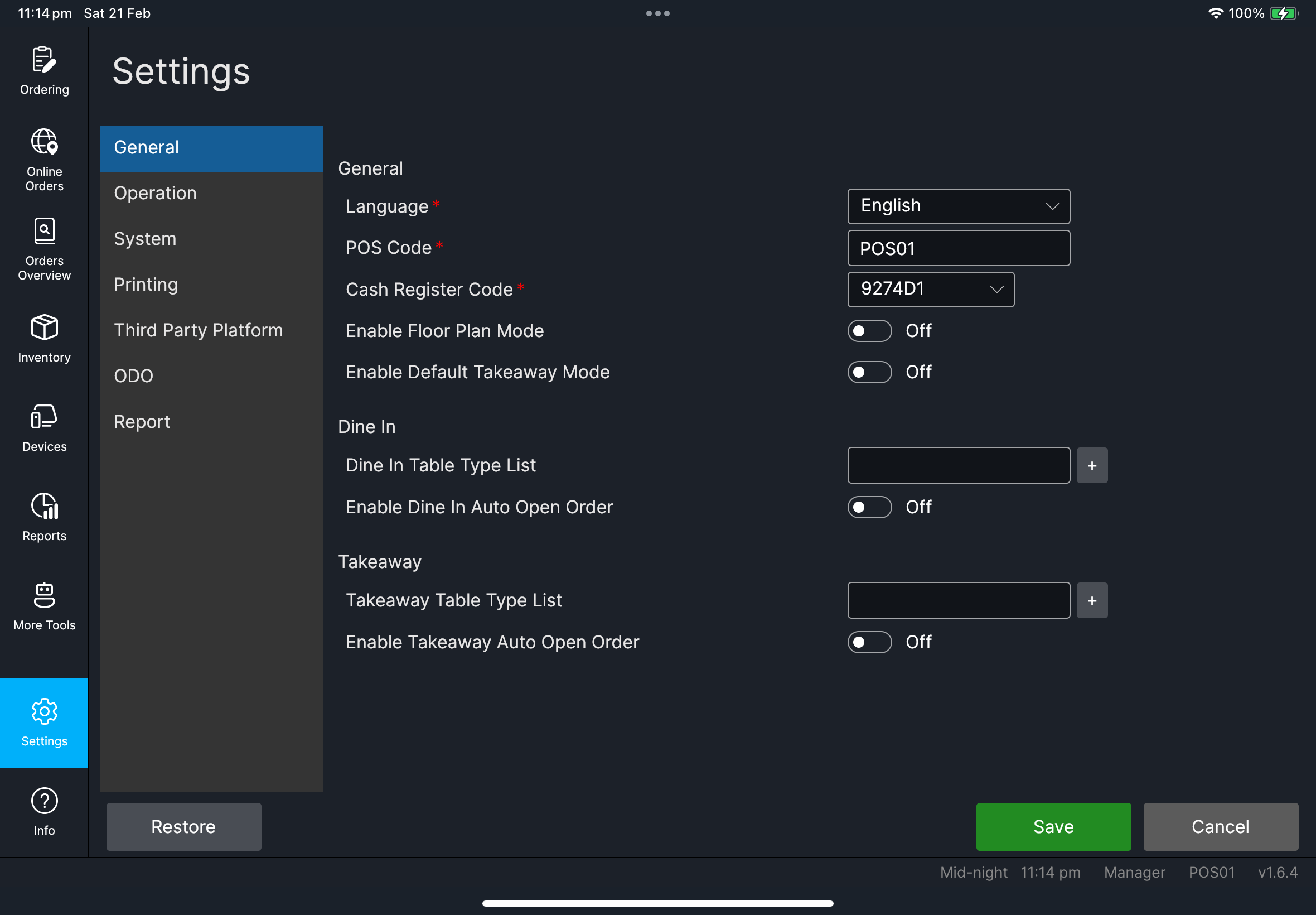
Language Configuration網格會顯示Item Mapping和Login Quick SwitchOperation->Terminal包含Mode,以及Restaurant和Quick Order操作->餐檯包含付款後保留餐檯General包含控制桌台先開還是直接開單流程的自動開單和自動分配設定System->Number包含Rounding Method、Decimal Places(如有顯示)和Round For Cash OnlyPrinting包含Mapping、Setting和Template分頁Printing->Setting包含Auto Print ReceiptPrinting->Setting包含Show Order Contact On Receipt和Show Order Contact On Kitchen OutputPrinting->Template的收據字體設定包含Customer ContactPrinting->Template包含八達通增值單和入賬 / 出賬單的字體設定列印->模板的標籤設定包含啟用自適應文字大小列印->模板包含自動重印時顯示「自動重印」標籤Report包含Print Qty、Daily Report Sections和Show advanced sectionsRestore操作位於設定底部
需要檔案:client/cl-40-settings-language-configuration-grid.png
需要檔案:client/cl-45-settings-print-order-contact-toggles.png
需要檔案:client/cl-46-settings-operation-terminal-mode.png、client/cl-47-settings-general-order-mode-toggles.png
需要檔案:client/cl-48-settings-print-auto-print-receipt.png、client/cl-49-settings-report-day-end-sections.png
需要檔案:client/cl-51-settings-template-label-adaptive-text-size.png
需要檔案:client/cl-53-settings-template-font-profiles.png
如果出現問題
請檢查必要欄位(POS Code、必要代碼)後再重試。
權限不足您的 POS 使用者群組不允許變更設定。請經理/管理員在 HQ POS Users 更新群組,或由已授權人員處理變更。
何時需要找經理/管理員
- 您沒有更改設定的權限
- 變更可能會影響所有終端 / 門店行為